Bad Design Habits for Websites

An important part of being a professional web designer is knowing what and doesn’t work. There are bad design habits for websites that a lot of builders don’t take notice of. Everything you design on a client’s website should be there for a specific reason, and should follow the most current design practices. Unfortunately, sometimes we all get stuck in a rut, and add certain website elements out of just habit, unaware that there might be a better, more freshen approach.
Dead Macintosh

We are half way through 2016, and it’s time to take a look at some of the most common offenders of web designs. Some are now out-dated, while others are actually toxic to the success of a website. We will examine why each should be forgotten, and what you can do instead to make sure you’re designing with the most current trends at your disposal.

Social Media Icons at the top of the Header

Every time your client has a visitor to their website, it’s a small win. So why would you want to give them a brightly coloured exit sign?

Usually in most cases, the point of a social media campaign is to drive visitors from social network sites to your client’s website, not the other way around. Even if a visitor follows the link with the specific purpose of following your client, the chances are that they will get distracted somewhere along the line, and not come back.
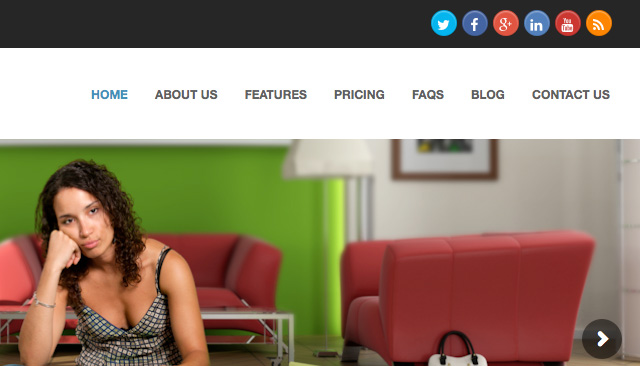
Social Buttons in Header

A Solution:

Your best approach is to start using social media plugins (WordPress) rather than a simple link icon. These will allow your visitors to like your Facebook or Twitter page, or add you on other social channels without bouncing them off the page. It means the users stay on the page, keeping your client’s visitors where you want them.

Try taking the emphasis off by moving them down the page, to either the footer or a sidebar. Also, I recommend to style them in perhaps a less eye catching way. It should only be visible for users who are looking for them, if you make them too colourful, it may entice the visitors to leave.

Tacky Stock Photos

We all know that full-width images are a popular and tired trend in web design, and they have actually been shown to increase conversions. Unfortunately, photos that are clearly of the stock variety can have the opposite effect. People can be turned off by anything they deem to think is not real, which causes distrust, thus taking conversion rates down.

Tacky Stock Photo

A Solution:

You have some choices, but will be largely determined by your client’s budget.

The first choice would be to hire a photographer. Customers respond very well to authenticity, so if your client’s actual photos are professionally taken, it will go a long way building trust. Photography can range in any price, so it can usually be achievable. These days, even a smartphone can take decent photo, if you put a little effort into it.

Another option, stick with stock photography, but choose it much more carefully. We have actually designed many websites using stock photos, but the trick is find the right image that don’t look cheap, and suits your clients business.

Only recently is there stock photo businesses that specialise in “authentic” looking photos. The kind that look like you would find scrolling through your Instagram feed.

Email Links

If part of the website you’re designing includes some type of staff bios, the question of email links will always come up. It’s an easy way of letting people get in touch easily with staff members, but it comes at a cost.

When you click an email link, it will trigger your computer’s native email client, which you may or may not use. Then, I must right-click the email address to save it, and paste it into my gmail.

Another issue is email links are usually crawled by robots, making your client’s website a sitting target for email spam.

Email Links

A Solution:

Most website have an email form on their site, (contact page,) just use this technique everywhere on the site that requires an email address. In the case of individual staff contacts, design one template you can use for each staff member, each with their own mini-contact form that will send to their email address. There are advantages to this approach:

  • Form emails are easily tracked
  • Emails sent through forms can be filtered through apps such as Google’s mail app
  • You can set up specific fields for emailers to complete

If you must include an email address on the website, just make sure they are not linked if you’d like to sidestep email spam. Your clients will appreciate that thinking.

Client-focused Copy

One of the best marketing tools you can bring to any website is professionally copy. In most cases clients use their websites as a brag-page, shouting to the world what makes them so damn amazing. The truth is, their customers could not care less.

Visitors need to be enticed in order to make a conversion. And what entices a user? Benefits. Specifically, how will this product or service benefit me.

By taking up valuable real estate space to brag about your client, you really aren’t looking at what matters. Take a look at the following example:

Client Focused Copy

Visitors don’t really care as much about the fact that they have been innovating since 1949.

A Solution:

Whether the websites copy is coming from you, or directly from your client, it has to address the benefits for the customer. A benefit is not a feature, and it’s not a brag. It should address an objection for a customer, and specifically say how they as a business can solve it.

So instead of “Packaging Quality, Service, and Innovation Since 1949,” you might try “Are You Tired of Paying for More Than You Need? High Quality Offset Packaging With No Minimum Orders.”

This addresses a specific point, and solves the problem easily.

Ghost Buttons that are a Call to Action

Ghost buttons are form over function. While they are not old-school it takes the visual weight out of a button, by surrounding the text with a simple rectangular stroke, it makes for a nice looking design element, but it comes with a price: it decreases click-throughs.

The trouble with ghost buttons is that they don’t always read as buttons. Good user experience states that buttons should be clickable obviously, and ghost buttons sometimes don’t hit the mark.

A Solution:

Simply stick with the basic. Your buttons (especially your main CALL TO ACTION) should be styled to look like a typical button. Here is some tips to design the perfect CALL TO ACTION button:

  • Shape – Rounded rectangles work better. Web buttons have always been associated with rectangles, and the rounded corners draw the eye inwards toward the copy.
  • Copy – Use action words wherever possible that highlight what the customer is getting, not what they are giving up. One example is “Get” is a more saleable word than the word “Buy.”
  • Color – The colour you use for the button should contrast with the background. Don’t go for subtle; You want your CALL TO ACTION to pop out at your customers.

While you should aim to avoid ghost buttons for your CALL TO ACTION, it can often a way to style your secondary line, especially when it is in close proximity to your primary line.
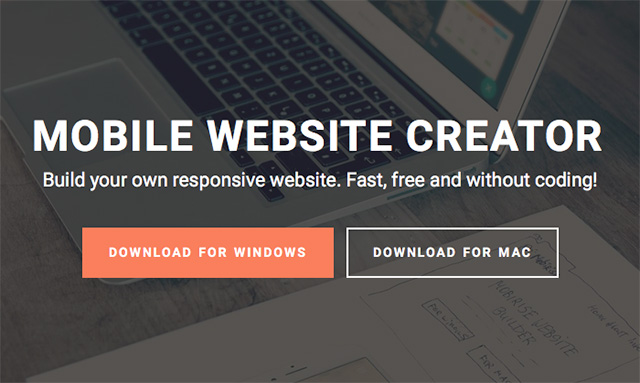
Ghost Buttons

In Summary

Every now you need to take a step back to see what features and techniques are adding to the success of your websites, as well as which ones are only getting in the way. We learn more about user behaviour, so we should always be evolving our methods in order to deliver the best possible result for our clients.


Things a Graphic Designer Doesn't Tell You about Effective Website Design

Have you Ever had a run-in with a graphic designer who promised you a outstanding website design but all you got was a big mess?

You know when you’re being taken advantage of. All you wanted was a website design that would promote your business and help you succeed, and what you got instead wasn’t worth the pixels it was painted on.

What’s worse is you have to start over. You’ve lost weeks or months of time, wasted thousands of dollars and possibly hurt your business reputation, and now you have to do the whole thing over again.

It’s daunting, let’s be honest. What if DesignLab were just as much of a nightmare?

Lucky for you, we’re not going to let that happen to you again. Here are some secrets many graphic designers don’t tell you, and knowing this can save you a time and money:


#1: Always being pretty doesn’t count.

Of course you want your website to look great and create a visual impact with your customers, but good looks don’t bring in sales.

A great tour guide does, though – and that’s your website’s job. It presents your business to customers and welcomes them, showing them around and introducing them to points of interest they should definitely see before they leave. As tour guide, your website has the task of providing visitors with the right guidance to direct them to where they want to go – and to where you want them to go as well.

You can have both a beautiful design and still  get results. If you find yourself having to choose between one or the other though, stick with getting results. Winning design awards may be nice, but it doesn’t pay the bills.


#2: You don’t need to redesign.

Remember, your web design is just one piece of a bigger picture. What if your message is wrong, and you need a copywriting overhaul? What if your brand image is pulling in the wrong target market? What if your marketing strategy has holes in it? What if there’s an issue with your product or service?

You can’t afford to ask a dozen specialists their opinion.

Ask a big-picture specialist for help – someone who can analyse elements of your website and pinpoint the problem.

You might be surprised to find out there’s nothing wrong with your website at all, and just a copy tweak or a new marketing strategy does the trick.


#3: You don’t need to spend a fortune.

There is a saying, you get what you pay for, and sometimes, that’s true. But it’s not true that you need to spend a fortune on a good website.

There are too many designers out there preying on this factor, charging enormous rates for their own profit. They blind you with techspeak and fancy coding terms.

Don’t be fooled by it.

Work out your budget and find a graphic designer who can work within it. Look for a designer that fits the style of a website you’d like for your business. Look at other sites you like and see who designed them. Ask for quotes, take your time and shop around.


#4: Maintaining a website isn’t always expensive.

Many business owners get ripped off on this one. Since graphic design and website development is usually a one-time expense, providers try to con you in as a customer so they can bill every month for recurring charges. Charges that don’t need to be.

So let’s look at web hosting? You can pay as little as $5 a month – why pay more? Look around.

Do you need to pay maintenance charges? Why? The upgrades that might come along every now and then? Opt for WordPress that lets you do your own upgrades just by clicking a button. We do.

You need to change content? A content management system wins again. Login to your site, and in two or three clicks, you’re updating your site, changing copy or adding a new page all by yourself. It’s that easy with WordPress.

When someone offers you an upsell maintenance package, ask what they’ll do for that money. Then go to Google and find out just how easy it is to do what they’ve offered you.

If your’e not interested in maintaining your site then by all means, hire someone to do it for you, but just be sure you’re not being overcharged for quick and easy jobs.


#5: You don’t need to be totally unique.

You do need to stand out these days and look different from all your competitors. The problem is that some graphic designers can take it a too far, and they design you a website that’s so unique it breaks all the rules of web design. Your expensive website ends up being a confusing experience for your customers.

Designers need to create websites that follow proper web conventions and usability rules, because these are the guides to navigating your site quickly and easily.

For example, consumers know they’ll generally find an RSS or email opt-in on the top right of a site – it’s always found here. Logos are usually found in the top left of a site, and navigation bars are usually found below header areas.

If you change that you’ll create a customer experience that’s similar to walking into an alien world. Nothing is where it’s supposed to be, everything is backwards.

And then what happens? Your potential customers leave. Your website becomes crippled and ineffective, all in the name of being unique.


#6: Branding is a specialist skill, and not all designers can do it well.

Most graphic designers are not skilled in developing brands. They’re good at developing graphic design that reflects your brand identity.

They assume your target market, and what appeals to those ideal customers. They’re assuming the values of your business and its marketing message. They’re assuming its personality and the type of experience your customers will have when they work with you or buy from you.

It’s far better to work with a branding expert to your developer your identity before you hire a designer, or work exclusively with graphic designers who understands branding and can develop a site that reflects your brand. Otherwise you’ll just attract the wrong kind of people, and the entire website will be a waste of time and money.


#7: Good Design Isn’t Just about Photoshop. It’s so much more…Psychology.

The secret to a great website isn’t in having a pretty design and some compelling content. The real secret is in psychology and consumer behaviour.

A graphic designer needs to know psychology. They need to know what imagery will appeal to your customers, and why it appeals to them. They need to know what’s going on in people’s minds when they land on your site and as they navigate through yours.

Are smooth curves better than concentric circles? What will draw your customers to the right or the left? What emotional state should your website create? Should the design be modern and simple or colourful and bold or soft and comforting? Where do a person’s eyes travel, and what will make them stop?

Good designers know all this and much more. They understand that their goal is to influence a visitor’s psychological state of mind and perception of your business. The more designers know about how people behave, what makes them take action and ways they react to different elements, the better they can implement persuasive strategies into your site.

Then they build you a site that captures interest, holds it, and ultimately brings you sales.